How the JioFiber Router Restores an Encrypted Config Backup
After decrypting my JioFiber router backup, I traced its restore code, found how the checksum was verified, and discovered that the configuration was executed as Lua.
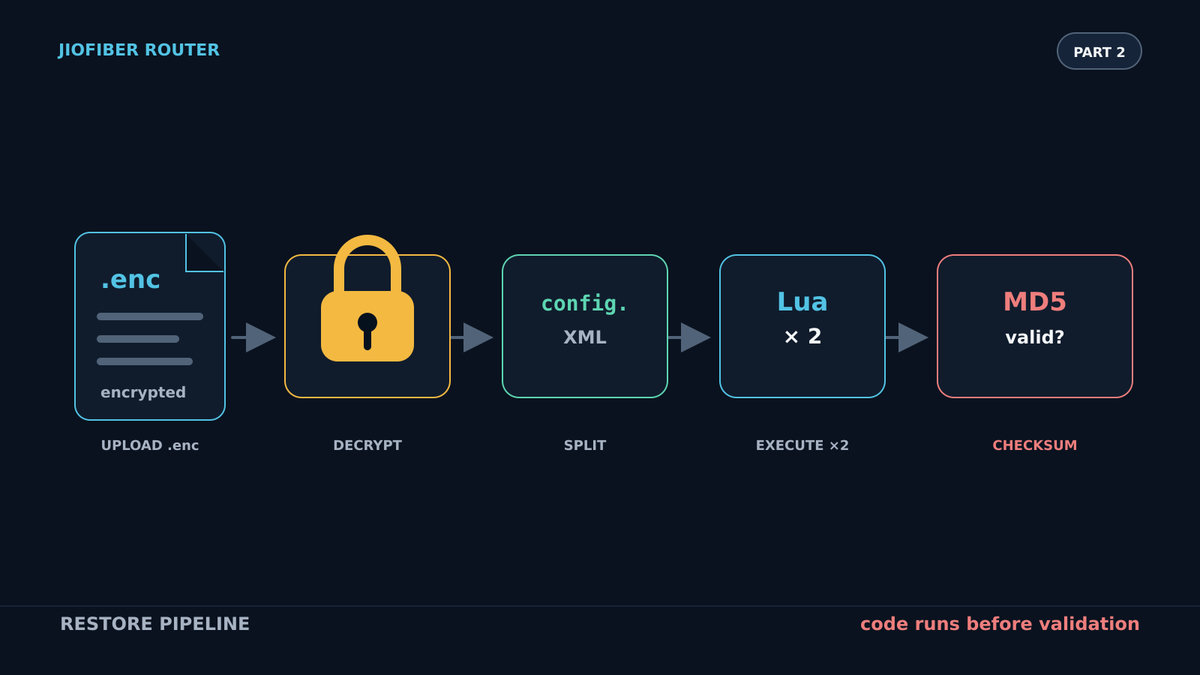
In the previous post, I decrypted the configuration backup from my JioFiber JCO4032 router. I could read and edit the configuration, but the router rejected my modified backup with a checksum error.
In this post, I am going to trace how the router restores that encrypted file, find out how it calculates the checksum, and use that knowledge to change the configuration. If you have not read the previous post, I highly recommend reading it first: Decrypting the JioFiber Router Config Backup (.enc).
Following the restore button
Previously, I found that /pfrm2.0/var/www/backupRestore.html contains the configuration backup and restore page for the JioFiber admin interface. The first few lines handle the restore button:
if (ButtonType and ButtonType == "restore") then
    local inputTable = web.cgiToLuaTable(cgi)

    -- If not allowed to edit
    if (ACCESS_LEVEL ~= 0) then
        errorFlag, statusCode = "ERROR", "ADMIN_REQD"
    else
        errorFlag, statusCode = gui.administration.firmware.cfg.restore(inputTable)
    end

    if (errorFlag == "OK") then
        statusCode = "Router will be up in"
    else
        NextPage = "backupRestore"
    end

    statusMessage = db.getAttribute(
        "stringsMap",
        "stringId",
        statusCode,
        LANGUAGE
    ) or statusCode

    web.goToPage(NextPage, true, true)
When I click Restore, the page turns the uploaded form data into a Lua table and passes it to gui.administration.firmware.cfg.restore(inputTable).
gui.lua loads teamf1lualib/administration, so I followed the function into /pfrm2.0/share/lua/5.1/teamf1lualib/administration.lua:
function gui.administration.firmware.cfg.restore(firmCfg)
    require "teamf1lualib/firmware"

    local status = nil
    local errMsg = nil

    if (ACCESS_LEVEL ~= 0) then
        return "ACCESS_DENIED", "ADMIN_REQD"
    else
        errMsg, status = firmware.restore(firmCfg)
    end

    return errMsg, status
end
This is mostly an access check. The actual work happens in firmware.restore(firmCfg), defined in /pfrm2.0/share/lua/5.1/teamf1lualib/firmware.lua.
Inside firmware.restore
The function starts by loading kliteLib and declaring the names and paths it will use while separating the backup:
function firmware.restore(inputTable)
    require "kliteLib"

    local statusMsg = nil
    local errMsg = nil

    -- DMS config files
    local CONFIG_FILE_NAME = ""
    local DMS_ACCESSCONF_NAME = ""
    local DMS_DESCRIPTION_NAME = ""
    local DMS_ACCESSCONF_FILE = ""
    local DMS_DESCRIPTION_FILE = ""

    if (
        util.fileExists("/pfrm2.0/ECONET") and
        not util.fileExists("/pfrm2.0/HW_NO_WIFI")
    ) then
        CONFIG_FILE_NAME = "local.teamf1.cfg.defaults.ascii"
        SMARTHOME_CONF_NAME = "sc.cnf"
        SMARTHOME_CONF_FILE = "/flash/smartcable/config/sc.cnf"
        DMS_ACCESSCONF_NAME = "access_conf.xml"
        DMS_DESCRIPTION_NAME = "dms_descr.xml"
        DMS_ACCESSCONF_FILE = "/flash/dms_xml/access_conf.xml"
        DMS_DESCRIPTION_FILE = "/flash/dms_xml/dms_descr.xml"
    end
The extracted JCO4032 firmware contains /pfrm2.0/ECONET and does not contain /pfrm2.0/HW_NO_WIFI, so this is the branch that applies to my router. It sets up four destinations: the main Lua configuration, a Smart Home configuration, and two DMS XML files.
The function then checks that the uploaded filename contains the router's model name and ends in .enc:
local filesize = inputTable["file.restore"]["filesize"]
local filename = inputTable["file.restore"]["filename"]
local filehandle = inputTable["file.restore"]["file"]

local modelName = util.fileToString(firmware.prodclassFile)
if (string.find(filename, modelName) == nil) then
    return "ERROR", "INVALID_BACKUP_FILE"
end

if (string.sub(filename, -3, -1) == "enc") then
    EncryptEnable = "1"
else
    return "ERROR", "INVALID_BACKUP_FILE"
end
Decrypting the uploaded backup
Next comes the decryption code:
-- Upload settings
local filename = cgilua.cookies.get("TeamF1Login")
local outFile = "out.cfg"
local encKey = "/pfrm2.0/etc/server.key"

-- If file is encrypted then decrypt it
if (EncryptEnable == "1") then
    kliteLib.openssl(
        "enc",
        "-aes-128-cbc",
        "-d",
        "-pass",
        "file:" .. encKey,
        "-in",
        UPLOAD_DIR .. filename,
        "-out",
        UPLOAD_DIR .. outFile
    )
    filename = outFile
end
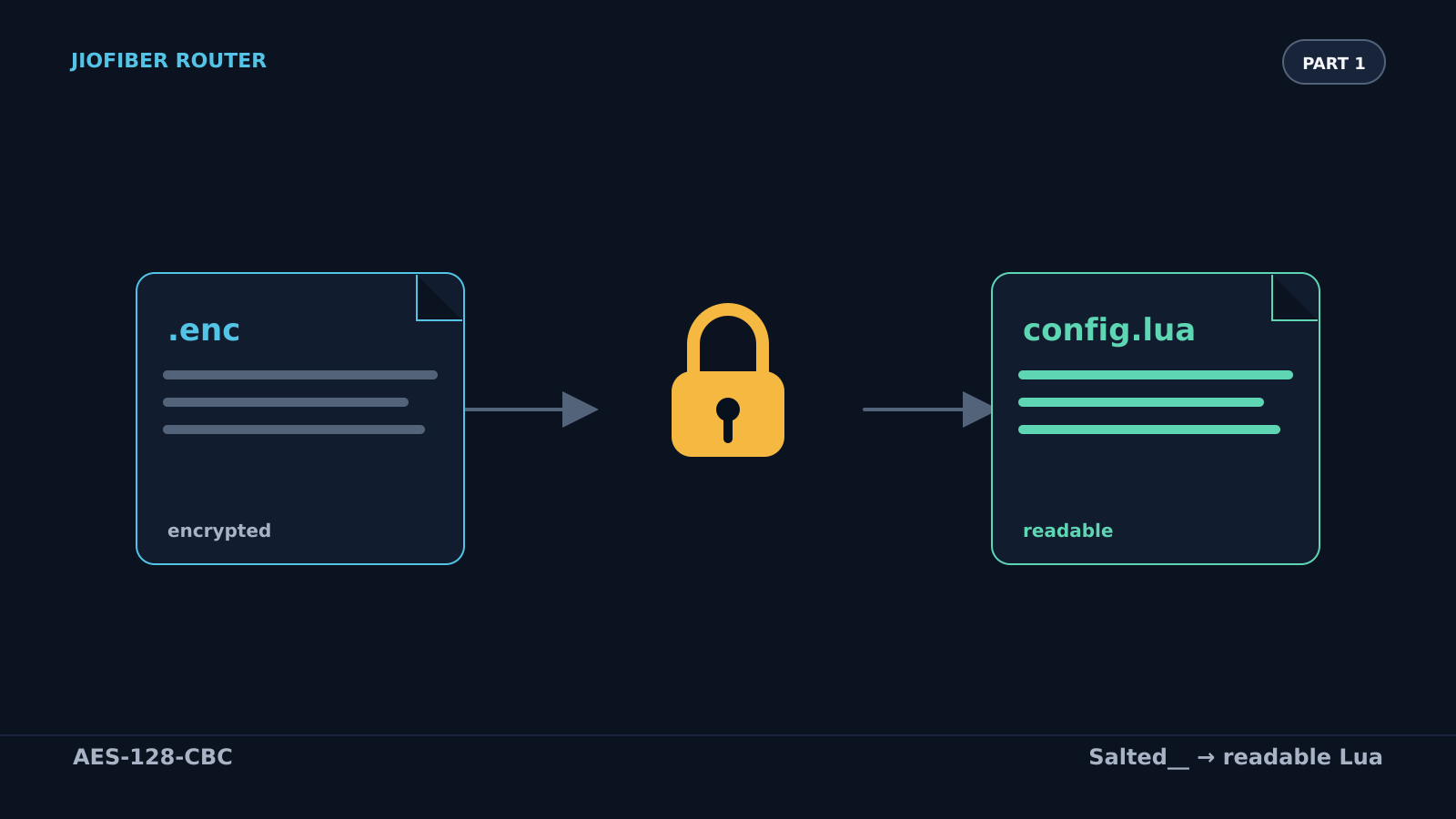
This is the reverse of the backup path from Part 1. The router uses OpenSSL with AES-128-CBC and reads the password from /pfrm2.0/etc/server.key. The decrypted upload is written to out.cfg.
Separating the files inside the backup
The decrypted backup is not just the Lua configuration. On this firmware it also contains XML and Smart Home data. The ECONET branch separates those parts:
if (
    util.fileExists("/pfrm2.0/ECONET") and
    not util.fileExists("/pfrm2.0/HW_NO_WIFI")
) then
    -- Separate the config and DMS config files
    file = UPLOAD_DIR .. filename
    lines = lines_from(file)

    tmpConfigFile = UPLOAD_DIR .. CONFIG_FILE_NAME
    tmpsmartHomeConfFile = UPLOAD_DIR .. SMARTHOME_CONF_NAME
    cfgFile = io.open(tmpConfigFile, "a")
    smartHomeConfigFile = io.open(tmpsmartHomeConfFile, "a")
    tmpDMSAccessFile = UPLOAD_DIR .. DMS_ACCESSCONF_NAME
    tmpDMSDescrFile = UPLOAD_DIR .. DMS_DESCRIPTION_NAME
    dmsConfigFile = io.open(tmpDMSAccessFile, "a")
    dmsConfig1File = io.open(tmpDMSDescrFile, "a")

    for k, v in pairs(lines) do
        if (string.find(v, "config%.")) then
            cfgFile:write(v .. "\n")
        elseif (string.find(v, "<")) then
            -- Copy access_conf.xml until </accessConfigRoot>
            if (flag == 0) then
                dmsConfigFile:write(v .. "\n")
                if (string.find(v, "/accessConfigRoot")) then
                    flag = 1
                end
            -- Copy the remaining XML into dms_descr.xml
            else
                dmsConfig1File:write(v .. "\n")
            end
        else
            smartHomeConfigFile:write(v .. "\n")
        end
    end

    cfgFile:close()
    smartHomeConfigFile:close()
    dmsConfigFile:close()
    dmsConfig1File:close()

    os.execute(
        "mv " .. UPLOAD_DIR .. CONFIG_FILE_NAME ..
        " " .. UPLOAD_DIR .. filename
    )
end
Every line containing config. goes into cfgFile. That includes the final checksum assignment:
config.checksum = "<checksum>"In the backup I examined, the XML rooted at <accessConfigRoot> goes into dmsConfigFile, while the following XML rooted at <root> goes into dmsConfig1File. smartHomeConfigFile is left empty. Finally, the function moves the separated Lua configuration back over out.cfg.
Finding the checksum check
Immediately after separating the files, the restore function verifies the main configuration:
if (config.verifyChecksum(UPLOAD_DIR .. filename) == "ok") then
    -- Remove old configuration
    os.execute("rm -f " .. SETTINGS_FILE .. " ")
    os.execute("rm -f " .. SETTINGS_FILE .. ".bkp")

    -- Remove TR-069 persistent data
    local cfg = db.getAttribute(
        "environment",
        "name",
        "TR69_PERSISTENT_STORE",
        "value"
    )
    if (cfg ~= nil) then
        os.execute("rm -Rf " .. cfg)
    end

    -- Copy file to flash
    os.execute(
        "mv " .. UPLOAD_DIR .. filename .. " " .. SETTINGS_FILE
    )
If config.verifyChecksum() does not return "ok", the other branch deletes the uploaded file and returns CONFIG_CHECKSUM_FAILURE. That is the checksum error I saw in the web interface.
I found config.verifyChecksum(fileName) in /usr/local/share/lua/5.1/teamf1lualib/config.lua:
-- Verify checksum on file
function config.verifyChecksum(fileName)
    -- Populate table entries from file
    if (pcall(loadfile(fileName))) then
        dofile(fileName)
    else
        return nil
    end

    -- Get checksum from systemConfig table
    local checksum_file = config["checksum"]

    -- Generate MD5 sum for file
    local checksum_md5sum = config.getChecksum(fileName)

    -- Verify checksum is correct or 0
    if (checksum_file == checksum_md5sum or checksum_file == "0") then
        return "ok"
    else
        return nil
    end
end
At first I did not pay much attention to the first block. I was focused on finding the checksum, and because I had never worked with Lua, I thought it was only loading the configuration variables.
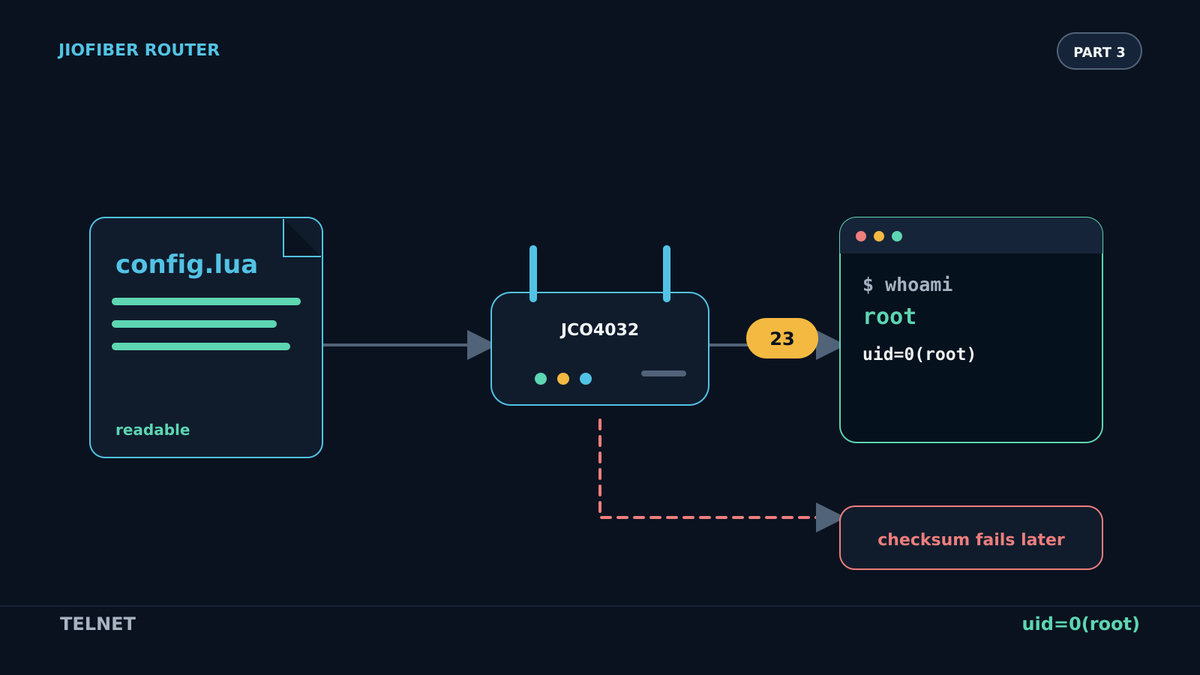
It does more than that. loadfile(fileName) compiles the file and returns a Lua function. Passing that function to pcall() executes it in protected mode. If it succeeds, dofile(fileName) loads and executes the file again. The configuration backup is therefore Lua code that runs on the router, not a passive data file. That detail became useful later when I worked out how to get root access, but I will cover that in Part 3.
For now, the next two lines are what mattered. checksum_file is the value assigned to config.checksum inside the backup. checksum_md5sum is calculated by config.getChecksum(fileName).
How the checksum is calculated
The implementation of config.getChecksum() is short:
-- Generate MD5 sum for file
function config.getChecksum(fileName)
    local pfile = io.popen(
        "cat " .. fileName ..
        " | grep -v 'checksum' | md5sum | cut -d' ' -f1"
    )
    local checksum = pfile:read("*a")
    pfile:close()

    -- Remove newline character
    return string.gsub(checksum, "\n", "")
end
The command reads the file, removes every line containing the text checksum, calculates the MD5 digest of what remains, and extracts only the digest from md5sum's output. Removing the checksum line avoids trying to include the checksum inside its own input.
I could reproduce that calculation myself. But the comparison at the end of config.verifyChecksum() had an easier path:
if (checksum_file == checksum_md5sum or checksum_file == "0") then
    return "ok"
else
    return nil
end
The first condition accepts a matching MD5 digest. The second accepts the literal string "0". I did not need to calculate a new checksum at all. I could replace the line in the decrypted configuration with:
config.checksum = "0"Editing and putting the config back
After changing the configuration and setting the checksum to "0", I encrypted it again with the same key file:
openssl aes-128-cbc \
    -kfile server.key \
    -in <serial>_JCO4032.txt \
    -out <serial>_JCO4032.enc
I uploaded the new .enc file through the restore option in the admin interface. This time the checksum check accepted it and the router applied the settings.
Keep the original .enc backup before changing anything. A broken configuration can make the admin interface or other router features unavailable, and the original file gives you a known configuration to restore.Turning off Jio's remote management (TR-069)
The configuration contains TR-069 settings. TR-069 is the protocol an ISP uses to manage a router remotely. The router connects to an Auto Configuration Server (ACS), and that server can change settings. In this case, the ACS is Jio's backend.
Here is the URL from my configuration:
config.tr69["ManagementServer"][1]["URL"] = "https://acs.oss.jio.com:8443/ftacs-digest/ACS"I changed it to a URL that could not connect:
config.tr69["ManagementServer"][1]["URL"] = "http://localhost:1234/ftacs-digest/ACS"I encrypted the file again and restored it. After that, changing the Wi-Fi SSID from the MyJio app no longer changed it on the router. The connection between Jio's backend and the router had been cut. Internet access kept working because ordinary browsing does not depend on TR-069.
There was a consequence: it also disabled JioJoin, which provides calling through the JioFiber landline number. Disabling remote management was therefore not an isolated change.
What I had missed
At this point I could decrypt the backup, change its values, bypass the checksum with "0", re-encrypt it, and restore it. But the most interesting line was not the checksum comparison. It was this one:
dofile(fileName)The router was not parsing the backup as a passive data format. It was executing it as Lua. I did not understand the significance of that when I first saw it. Once I did, it became the path to root access.
Part 3: How I got root access to my JioFiber router. It follows what happens when the restore path executes a modified configuration file.
Discussion
No comments yet